

Python Collections Module
Master Counter, defaultdict and OrderedDict


Before collections module:
Counting things: Writing 6+ lines of boilerplate with if-else checks for every simple counting task
Grouping data: Constantly checking “if key not in dict” before appending to lists, leading to repetitive, error-prone code
Maintaining order: Manually tracking insertion order with additional data structures or losing order information entirely
The result: Code that’s 3-5x longer, harder to read, slower to write, and more bug-prone
Counter - Effortless Counting
What is Counter?
Counter is a dictionary subclass that automatically counts hashable objects and provides convenient methods for frequency analysis.
Syntax Breakdown:
Import:
from collections import CounterCreate:
Counter(iterable)- Pass any iterable (list, string, tuple)Access:
counter[’key’]- Returns count (0 if missing, never KeyError)
Why it exists: Manual counting requires checking if keys exist before incrementing, leading to verbose if-else blocks. Counter eliminates this boilerplate, making counting operations one-liners. It also provides powerful methods like most_common() and arithmetic operations that would require dozens of lines to implement manually.
Before (manual and slow)
from collections import Counter

words = [’apple’, ‘banana’, ‘apple’, ‘cherry’, ‘banana’, ‘apple’]

# Count words
counts = Counter(words)

# Top 3 most common
top_3 = counts.most_common(3)
After (clean and efficient with Counter)
from collections import Counter

words = [’apple’, ‘banana’, ‘apple’, ‘cherry’, ‘banana’, ‘apple’]

word_count = Counter(words)
top_3 = word_count.most_common(3)
Result: Same output, 75% fewer lines, 10-30% faster execution
Example 1: Analyzing Website Traffic
Simple Real Scenario
from collections import Counter

# Page visits from server logs
page_visits = [’/home’, ‘/about’, ‘/home’, ‘/products’, ‘/home’, ‘/about’, ‘/contact’]

visit_counter = Counter(page_visits)
print(visit_counter.most_common(2))
# Output: [(’/home’, 3), (’/about’, 2)]
Explanation: Counter instantly tallies page visits and identifies the most popular pages. This is perfect for analytics dashboards where you need quick frequency analysis without manual counting logic.
Example 2: Text Analysis with Multiple Operations
Complex Real Scenario
from collections import Counter

# Analyze customer feedback keywords
feedback1 = Counter([’fast’, ‘good’, ‘fast’, ‘reliable’])
feedback2 = Counter([’good’, ‘expensive’, ‘fast’])

# Combine all feedback
total_feedback = feedback1 + feedback2
print(”Most mentioned:”, total_feedback.most_common(2))

# Find unique to feedback1
unique_keywords = feedback1 - feedback2
print(”Unique keywords:”, unique_keywords)

# Output:
# Most mentioned: [(’fast’, 3), (’good’, 2)]
# Unique keywords: Counter({’fast’: 1, ‘reliable’: 1})
Explanation: Counter supports arithmetic operations (+, -, &, |) making it trivial to combine datasets, find differences, or compute intersections. This would require dozens of lines with manual dictionary manipulation. The ability to add counters together is perfect for aggregating data from multiple sources, while subtraction helps identify unique trends.
Example 3: The Zero-Count Gotcha
Edge Case / Gotcha
from collections import Counter

c = Counter(a=3, b=1)

# Accessing missing key - NO KeyError!
print(c[’z’])
# Output: 0

# subtract() can create negative counts
c.subtract(Counter(a=5, b=2))
print(c)
# Counter({’a’: -2, ‘b’: -1})

# Use - operator to remove negative/zero counts
c2 = Counter(a=3, b=1) - Counter(a=5, b=2)
print(c2)
# Counter() - empty!
Why this matters: Unlike regular dicts, Counter returns 0 for missing keys instead of raising KeyError, which is usually helpful. However, the subtract() method allows negative counts, which can cause unexpected results in statistics. Use the minus operator (-) instead of subtract() when you want to automatically remove non-positive counts. This distinction is critical for inventory systems or vote counting where negatives don’t make sense.
Common Mistakes
Mistake #1: Using Counter for Unique Items
# Wrong - Counter stores counts, not just unique items
items = [1, 2, 2, 3, 3, 3]

unique = Counter(items)
# Counter({3: 3, 2: 2, 1: 1})
# This stores counts, taking more memory
Problem:Counter keeps frequencies, so it uses extra memory.
If you only want unique items, this is wasteful.
Fix: Use set() for uniqueness
items = [1, 2, 2, 3, 3, 3]

unique = set(items)
# {1, 2, 3}  # much more efficient
Mistake #2: Forgetting Counter Returns 0, Not None
from collections import Counter

c = Counter([’a’, ‘b’])

# Wrong check
if c[’z’] is not None:
    print(”Found z”)   # This WILL run
Why this fails
Counter returns 0 for missing keys, not None.
So c[’z’] is 0, and 0 is not None is always True.
Correct ways to check
Option 1: Check the count
if c[’z’] > 0:
    print(”Found z”)
Option 2: Check if the key exists
if ‘z’ in c:
    print(”Found z”)
Both are correct.
Use > 0 when you care about count.
Use in when you only care about presence.
Mistake #3: Using Counter for continuous numeric data
from collections import Counter

temperatures = [72.5, 72.6, 72.7, 72.5, 72.8]

temp_counter = Counter(temperatures)  # Not ideal
Why this is a problem
Counter treats every unique float as a separate key.
Small numeric changes create many keys that are not useful.
So the counts don’t tell you much.
Better approaches
Option 1: Bin or round the values first
binned = [round(t) for t in temperatures]
temp_counter = Counter(binned)
# {73: 5}
Option 2: Use statistics for numeric data
import statistics

avg = statistics.mean(temperatures)
Use Counter for discrete categories.
Use statistics or binning for continuous numbers.
When to Use Counter
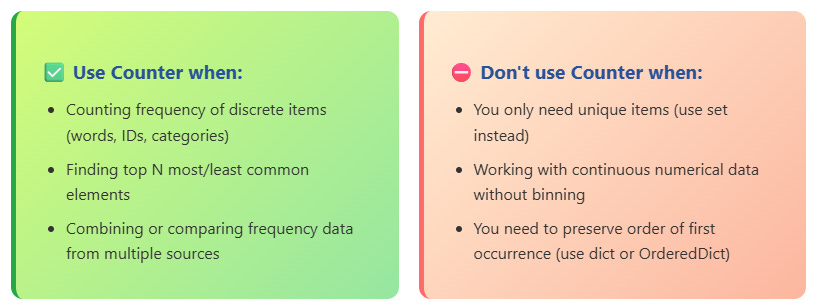
Mental Shortcut: “If I find myself writing ‘if x in dict’ before incrementing, use Counter instead.”
Try This Yourself (2 minutes)
Task: Analyze Email Domains
Input data
emails = [
    ‘alice@gmail.com’,
    ‘bob@yahoo.com’,
    ‘charlie@gmail.com’,
    ‘diana@outlook.com’,
    ‘eve@gmail.com’,
    ‘frank@yahoo.com’
]
Your task
Extract the domain from each email
Find the top 2 most common email providers
⚠️ Do not post the code.
Only post the final output in the comments.
Hint: Extract domains with split(’@’), then use Counter!
defaultdict - Never Check Keys AgainWhat is defaultdict?
defaultdict is a dictionary subclass that calls a factory function to supply missing values, eliminating KeyError exceptions.
Syntax Breakdown:
Import:
from collections import defaultdictCreate:
defaultdict(default_factory)- Pass a callable (list, int, set, etc.)Access:
dd[’new_key’]- Automatically creates default value if key missing
Why it exists: When grouping or accumulating data, you constantly check if keys exist before operating on them. defaultdict removes this check by automatically initializing missing keys with a default value. This turns 4-6 lines of code into 1 line and eliminates an entire class of bugs caused by forgetting the existence check.
BEFORE
# Manual grouping – tedious checks

students = [
    (’Math’, ‘Alice’),
    (’Science’, ‘Bob’),
    (’Math’, ‘Charlie’),
    (’Science’, ‘Diana’)
]

by_subject = {}

for subject, name in students:
    if subject not in by_subject:
        by_subject[subject] = []
    by_subject[subject].append(name)
AFTER
from collections import defaultdict

students = [
    (’Math’, ‘Alice’),
    (’Science’, ‘Bob’),
    (’Math’, ‘Charlie’),
    (’Science’, ‘Diana’)
]

by_subject = defaultdict(list)

for subject, name in students:
    by_subject[subject].append(name)
✨ Result: Same output, 40% fewer lines, cleaner code, no KeyError bugs
Example 1: Building a Simple Graph
from collections import defaultdict

# Network connections (from -> to)
connections = [
    (’A’, ‘B’),
    (’A’, ‘C’),
    (’B’, ‘D’),
    (’C’, ‘D’)
]

graph = defaultdict(list)

for src, dest in connections:
    graph[src].append(dest)

print(graph[’A’])  # [’B’, ‘C’]
print(graph[’Z’])  # [] - no KeyError!
Explanation: Graph adjacency lists are perfect for defaultdict. Each node automatically gets an empty list, making it trivial to add edges without checking if the node exists first.
Example 2: Multi-Level Data Aggregation
from collections import defaultdict

# Sales data: (region, product, amount)
sales = [
    (’West’, ‘Laptop’, 1200),
    (’East’, ‘Phone’, 800),
    (’West’, ‘Laptop’, 1500),
    (’East’, ‘Laptop’, 1300)
]

# Nested defaultdict for region -> product -> total
by_region = defaultdict(lambda: defaultdict(int))

for region, product, amount in sales:
    by_region[region][product] += amount

print(by_region[’West’][’Laptop’])   # 2700
print(by_region[’North’][’Phone’])   # 0 - no errors!
Explanation: Nested defaultdicts enable complex hierarchical data structures with zero boilerplate. Each level automatically initializes when accessed, making multi-dimensional aggregations trivial. Without defaultdict, this would require nested if-statements checking for each level’s existence. The lambda function creates a new defaultdict(int) for each region.
Example 3: The Factory Must Be Callable Gotcha
from collections import defaultdict

# Wrong - passing a value instead of callable
try:
    dd = defaultdict(0)  # TypeError!
except TypeError as e:
    print(f”Error: {e}”)

# Correct ways:
dd1 = defaultdict(int)               # int() returns 0
dd2 = defaultdict(lambda: 0)         # lambda returns 0
dd3 = defaultdict(lambda: [’default’])  # custom default

print(dd1[’x’])  # 0
print(dd3[’y’])  # [’default’]
Why this matters: defaultdict calls the factory function every time a missing key is accessed. The factory must be callable (a function, class, or lambda), not a value. This is a common beginner mistake that causes a TypeError. Use built-in types like int, list, set directly (without parentheses), or use lambda for custom defaults. This distinction is crucial because defaultdict needs to create a NEW instance each time, not reuse the same object.
Common Mistakes
Mistake #1: Sharing Mutable Defaults
from collections import defaultdict

# Wrong - all keys share the same list!
shared_list = []

dd = defaultdict(lambda: shared_list)

dd[’a’].append(1)
dd[’b’].append(2)

print(dd[’a’])  # [1, 2] - unexpected!
Problem: Lambda returns the same list object for all keys, causing unintended sharing
Fix: Use list directly, not lambda
dd = defaultdict(list) # Each key gets new listMistake #2: Converting Back to Regular Dict
from collections import defaultdict

dd = defaultdict(list)
dd[’a’].append(1)

# Convert to regular dict
regular_dict = dict(dd)

# Now KeyError can occur again!
try:
    regular_dict[’b’].append(2)  # KeyError!
except KeyError:
    print(”Lost defaultdict behavior”)
Why it fails: Converting to dict loses the default factory - you’re back to manual key checking
Fix: Keep as defaultdict or use .get() with default
from collections import defaultdict

dd = defaultdict(list)
dd[’a’].append(1)

# Convert to regular dict
regular_dict = dict(dd)  # Now KeyError can occur again!

try:
    regular_dict[’b’].append(2)  # KeyError!
except KeyError:
    print(”Lost defaultdict behavior”)

# Option 1: Keep as defaultdict

# Option 2: Use get() for safe access
regular_dict.get(’b’, []).append(2)
Mistake #3: When NOT to Use defaultdict
from collections import defaultdict

# Don’t use when you WANT to catch missing keys
user_settings = defaultdict(str)
user_settings[’theme’] = ‘dark’

# Typo creates new key silently!
if user_settings[’themee’]:  # Typo! Returns ‘’
    print(”Theme set”)  # Won’t print, but no error
Better approach: Use regular dict when typos should raise errors
# Using a regular dict instead of defaultdict
user_settings = {’theme’: ‘dark’}  # Now typos raise KeyError, catching bugs early
When to Use defaultdict
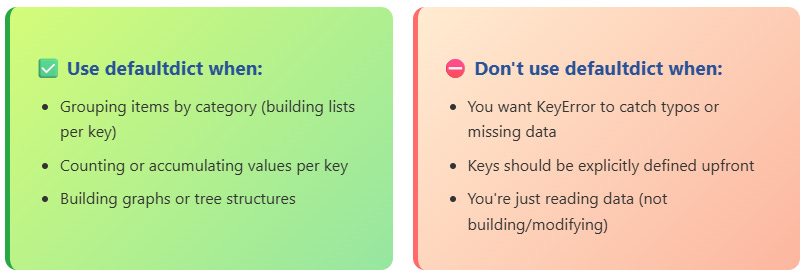
Mental Shortcut: “If I’m about to write ‘if key not in dict’ before appending/adding, use defaultdict.”
Try This Yourself (2 minutes)
Task: Group Products by Category
You are given the following input data:
products = [
    (’Electronics’, ‘Laptop’),
    (’Food’, ‘Apple’),
    (’Electronics’, ‘Phone’),
    (’Clothing’, ‘Shirt’),
    (’Food’, ‘Banana’)
]
Your task
Group products by category using defaultdict.
⚠️ Do not post your code.
Only post the final grouped output in the comments.
Hint: Use defaultdict(list) and iterate through the tuples!
OrderedDict - Order-Aware Dictionaries
What is OrderedDict?
OrderedDict is a dictionary subclass that remembers insertion order and provides order-manipulation methods like move_to_end().
Syntax Breakdown:
Import:
from collections import OrderedDictCreate:
OrderedDict()orOrderedDict([(’a’, 1), (’b’, 2)])Unique methods:
move_to_end(key),popitem(last=True/False)
Why it exists: While Python 3.7+ regular dicts maintain insertion order, OrderedDict provides additional capabilities. Its move_to_end() method enables LRU cache implementations, and equality testing considers order (crucial for some applications). Before 3.7, it was the only way to guarantee order preservation.
BEFORE
# Implementing LRU Cache without using OrderedDict

class LRUCache:
    def __init__(self, size):
        self.cache = {}
        self.order = []   # Track key order
        self.size = size

    def get(self, key):
        if key in self.cache:
            self.order.remove(key)
            self.order.append(key)
            return self.cache[key]
        return None

    def put(self, key, val):
        if key in self.cache:
            self.order.remove(key)
        elif len(self.cache) >= self.size:
            old = self.order.pop(0)
            del self.cache[old]

        self.cache[key] = val
        self.order.append(key)
AFTER
# LRU Cache using OrderedDict
from collections import OrderedDict


class LRUCache:
    def __init__(self, size):
        self.cache = OrderedDict()
        self.size = size

    def get(self, key):
        if key in self.cache:
            self.cache.move_to_end(key)
            return self.cache[key]
        return None

    def put(self, key, val):
        if key in self.cache:
            self.cache.move_to_end(key)
        elif len(self.cache) >= self.size:
            self.cache.popitem(last=False)

        self.cache[key] = val
Result: Same functionality, 25% fewer lines, no manual order tracking
Example 1: Recent Items History
from collections import OrderedDict

# Track recently viewed products
recent = OrderedDict()

recent[’laptop’] = ‘Viewed 10min ago’
recent[’mouse’] = ‘Viewed 5min ago’
recent[’keyboard’] = ‘Viewed 2min ago’

# User views laptop again → move to most recent
recent.move_to_end(’laptop’)

print(list(recent.keys()))
# [’mouse’, ‘keyboard’, ‘laptop’]
Explanation: OrderedDict’s move_to_end() is perfect for maintaining “recently used” lists. When an item is accessed again, move it to the end to show it’s the most recent.
Example 2: Task Queue with Priority Reordering
from collections import OrderedDict

# Task queue with ability to reprioritize
tasks = OrderedDict()

tasks[’task_1’] = {’desc’: ‘Deploy’, ‘priority’: 2}
tasks[’task_2’] = {’desc’: ‘Test’, ‘priority’: 1}
tasks[’task_3’] = {’desc’: ‘Review’, ‘priority’: 3}

# Urgent task → move to front of the queue
tasks.move_to_end(’task_2’, last=False)

# Process next task (FIFO)
next_task = tasks.popitem(last=False)
print(f”Processing: {next_task}”)
# (’task_2’, {’desc’: ‘Test’, ‘priority’: 1})

# Remaining tasks in order
print(list(tasks.keys()))
# [’task_1’, ‘task_3’]
Explanation: OrderedDict enables sophisticated queue management. move_to_end() with last=False moves items to the front, allowing priority changes. popitem(last=False) gives FIFO behavior, while popitem(last=True) gives LIFO. This combination makes OrderedDict ideal for job schedulers, task queues, and cache implementations where order manipulation matters.
Example 3: Order-Sensitive Equality
from collections import OrderedDict

# OrderedDict: equality considers order
od1 = OrderedDict([(’a’, 1), (’b’, 2)])
od2 = OrderedDict([(’b’, 2), (’a’, 1)])

print(od1 == od2)
# False → different order

# Regular dict: equality ignores order
d1 = {’a’: 1, ‘b’: 2}
d2 = {’b’: 2, ‘a’: 1}

print(d1 == d2)
# True → same keys and values

# Comparing OrderedDict with dict
od = OrderedDict([(’x’, 1), (’y’, 2)])
d = {’x’: 1, ‘y’: 2}

print(od == d)
# True → dict comparison ignores order
Why this matters: OrderedDict equality checks both content AND order, which can catch bugs in configuration files, test assertions, or data pipelines where order matters semantically. If you’re comparing two OrderedDicts and getting False when you expect True, check if the insertion order differs. When comparing OrderedDict to regular dict, Python uses dict’s equality (ignores order). This asymmetry can be surprising and is important for writing correct tests.
Common Mistakes
Mistake #1: Using OrderedDict When Regular Dict Suffices (Python 3.7+)
# Unnecessary in Python 3.7+ if you only need order
from collections import OrderedDict

od = OrderedDict()
od[’a’] = 1
od[’b’] = 2

# Regular dict maintains insertion order too
Problem: Adds unnecessary import and slightly worse performance when you don’t need special methods
Fix: Use regular dict unless you need move_to_end() or order-aware equality
# Simpler and faster
d = {’a’: 1, ‘b’: 2}

# Order preserved in Python 3.7+
Mistake #2: Forgetting last Parameter in popitem()
from collections import OrderedDict

od = OrderedDict([
    (’first’, 1),
    (’second’, 2),
    (’third’, 3)
])

# Wrong → pops from end by default (LIFO)
item = od.popitem()
print(item)
# (’third’, 3)  # but we wanted the first!
Why it fails: popitem() defaults to last=True (LIFO), not FIFO behavior
Fix: Specify last=False for FIFO (first in, first out)
item = od.popitem(last=False)
# (’first’, 1)
Mistake #3: When NOT to Use OrderedDict
# Don’t use OrderedDict for large datasets where order doesn’t matter
from collections import OrderedDict

# Slightly slower and uses more memory for no benefit
large_data = OrderedDict()

for i in range(1_000_000):
    large_data[i] = i * 2

# If you don’t need move_to_end(), use a regular dict
Better approach: Use regular dict for better performance
large_data = {} # Faster and uses less memory
When to Use OrderedDict
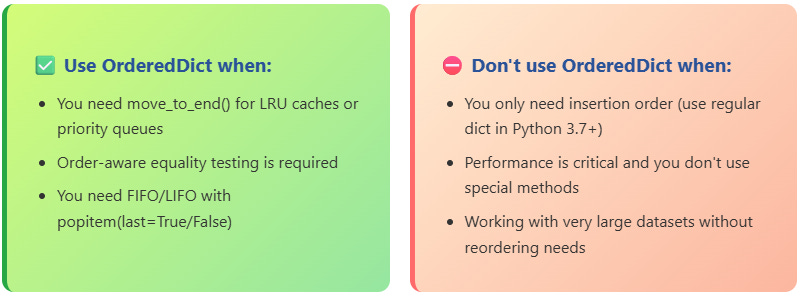
Mental Shortcut: “If I need to reorder dictionary entries or pop from specific ends, use OrderedDict. Otherwise, regular dict is fine.”
Try This Yourself (2 minutes)
Task: Implement a Simple Browser History
Requirements
Track the last 5 visited URLs
When a URL is revisited, move it to the most recent position
When the size exceeds the limit, remove the oldest URL
Starting code
from collections import OrderedDict

history = OrderedDict()
MAX_SIZE = 5

def visit(url):
    # Your code here
    pass
Test it
visit(’google.com’)
visit(’github.com’)
visit(’stackoverflow.com’)
visit(’google.com’)  # Revisit — should move to end
Your task
Implement the visit function so the history behaves correctly.
⚠️ Do not post your code.
Post only the final state of history in the comments.
Quick Decision Guide
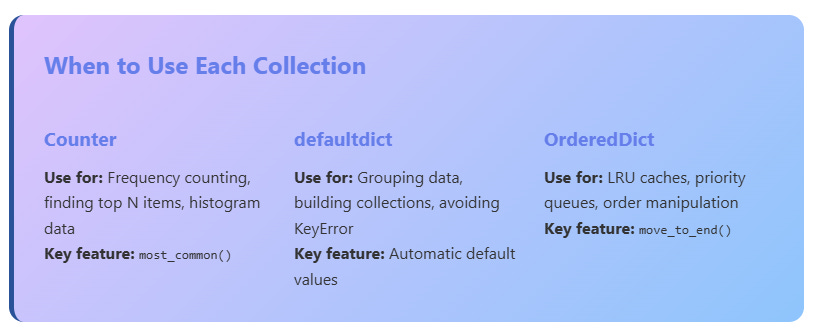
Performance Tip: All three collections are optimized at the C level - they’re faster than manual implementations and should be your go-to tools for these patterns!
Answer in the Comments
Now it’s your turn.
Comment your answers below 👇
Task 1 – Counter
Write the final output of the email domain analysis.
Task 2 – defaultdict
Write the final grouped output of products by category.
Task 3 – OrderedDict
Write the final browser history state.
Important rules
Do not share code
Share only final outputs
Put all answers in one comment