

Deep Dive into Python Set 🐍
Master Set Theory Operations & Advanced Use Cases

What Are Python Sets?
Sets are unordered collections of unique elements. They’re Python’s implementation of mathematical sets, providing powerful operations for working with collections of distinct items. Sets are mutable, fast for membership testing, and automatically eliminate duplicates.
# Creating sets
my_set = {1, 2, 3, 4, 5}
empty_set = set()
# Note: {} creates a dict, not a set!
from_list = set([1, 2, 2, 3])
# Result: {1, 2, 3}
Core Set Operations
Union (Combine All Elements)
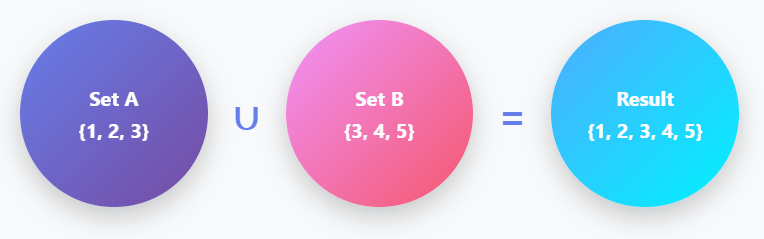
A = {1, 2, 3}
B = {3, 4, 5}
# Three ways to perform union:
result = A | B # Using operator
result = A.union(B) # Using method
result = A | B | {6, 7}
# Chain multiple sets
2. Intersection (Common Elements)
Intersection finds elements that exist in both sets.

A = {1, 2, 3, 4}
B = {3, 4, 5, 6}

# Two ways to perform intersection:
result = A & B              # Using operator
result = A.intersection(B)  # Using method
3. Difference (Elements in A, Not in B)
Difference finds elements in the first set but not in the second.

A = {1, 2, 3, 4}
B = {3, 4, 5}

result = A - B            # {1, 2}
result = A.difference(B)  # {1, 2}
result = B - A            # {5}  # order matters!
4. Symmetric Difference (Exclusive Elements)
Symmetric Difference finds elements in either set, but not in both.
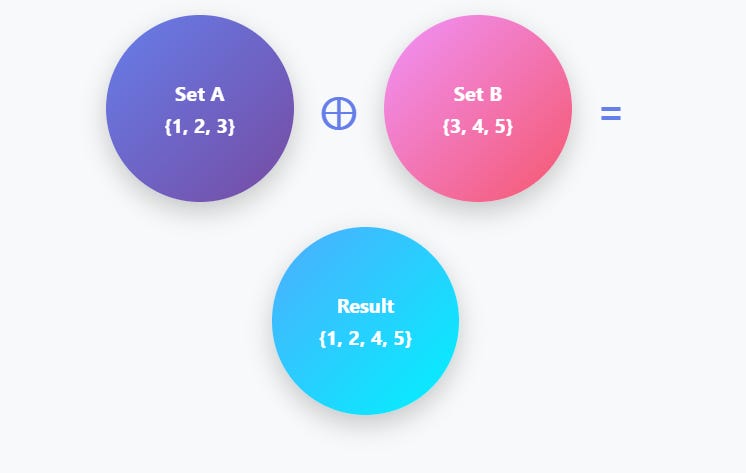
A = {1, 2, 3}
B = {3, 4, 5}

result = A ^ B                      # {1, 2, 4, 5}
result = A.symmetric_difference(B)  # {1, 2, 4, 5}
Set Mutability & Methods
Key Point: Sets are mutable (can be changed), but frozensets are immutable. Set elements must be immutable (hashable) types.
Adding and Removing Elements
s = {1, 2, 3}

# Adding elements
s.add(4)                 # {1, 2, 3, 4}
s.update([5, 6, 7])      # {1, 2, 3, 4, 5, 6, 7}

# Removing elements
s.remove(3)              # Removes 3, but raises KeyError if 3 is not present
s.discard(3)             # Safe — does nothing if 3 is absent

item = s.pop()           # Removes and returns an arbitrary element (not random each time, but not guaranteed order)

s.clear()                # Empties the entire set
Frozensets (Immutable Sets)
# Frozensets can be used as dictionary keys or set elements
fs = frozenset([1, 2, 3])

nested = {frozenset([1, 2]), frozenset([3, 4])}
# This is valid because frozensets are hashable

# This is NOT valid:
nested = {{1, 2}, {3, 4}}
# TypeError: unhashable type: ‘set’
Performance Characteristics
Why Sets Are Fast: Sets use hash tables internally, providing O(1) average-case time complexity for membership testing, insertion, and deletion.

Performance Comparison: Sets vs Lists
# Membership testing comparison
large_list = list(range(1_000_000))
large_set = set(range(1_000_000))

# List: O(n) — slow for large collections
999_999 in large_list      # ~0.02s (checks items one by one)

# Set: O(1) — very fast lookup
999_999 in large_set       # ~0.000001s (hash lookup)
Advanced Use Cases
1. Removing Duplicates Efficiently
The fastest way to remove duplicates from a large list while preserving uniqueness.
# Naive approach - O(n²) time complexity
def remove_duplicates_slow(lst):
    result = []
    for item in lst:
        if item not in result:   # O(n) lookup each time
            result.append(item)
    return result


# Set approach - O(n) time complexity
def remove_duplicates_fast(lst):
    return list(set(lst))        # Fast, but order is lost


# Preserve order while removing duplicates - O(n)
def remove_duplicates_ordered(lst):
    seen = set()
    result = []
    for item in lst:
        if item not in seen:
            seen.add(item)
            result.append(item)
    return result


# Example
data = [1, 2, 2, 3, 4, 3, 5, 1]
print(remove_duplicates_ordered(data))
# [1, 2, 3, 4, 5]
2. Finding Common Elements Across Multiple Lists
Intersection makes finding common elements across multiple collections trivial.
# Find users who purchased in all three months
jan_users = {’alice’, ‘bob’, ‘charlie’, ‘david’}
feb_users = {’bob’, ‘charlie’, ‘eve’}
mar_users = {’bob’, ‘charlie’, ‘frank’}

loyal_customers = jan_users & feb_users & mar_users
print(loyal_customers)      # {’bob’, ‘charlie’}

# Alternative with intersection method
loyal_customers = jan_users.intersection(feb_users, mar_users)
print(loyal_customers)      # {’bob’, ‘charlie’}
3. Finding Unique Elements
Identify elements that appear in one collection but not others.
# Find features in new version not in old version
old_features = {’login’, ‘search’, ‘profile’}
new_features = {’login’, ‘search’, ‘profile’, ‘chat’, ‘video’}

added_features = new_features - old_features
print(added_features)       # {’chat’, ‘video’}

removed_features = old_features - new_features
print(removed_features)     # set()
Sets are an easy way to work with items that should appear only once. They let you combine groups, find common items, spot differences, and check membership very quickly. Because they’re built for speed, sets handle large amounts of data better than lists when you just need to check if something exists. With a few simple methods, you can clean data, remove repeats, and compare versions or user groups without much code. Once you get comfortable with them, sets become a very handy tool in everyday Python work.
I learned most of this late — by writing messy code first and fixing it later.
This article is one part of a larger series I’m building:
The Tech Stack I Wish Someone Taught Me in Order
Next:Python Dictionary Comprehensions Explained: Easy Guide with Examples